
By SipHours Editorial · Published 2026-02-03 · Updated 2026-03-18 · 8 min read
A water intake tracker answers one practical question: did you drink the volume you meant to drink today? SipHours is a free Android water intake tracker that combines a daily ml/oz goal, one-tap sip logging, and hourly reminders during waking hours so tracking stays lighter than a spreadsheet. Guidance from Mayo Clinic and National Academies-style total-water ranges still frames healthy adult averages—roughly 3.7 L / 2.7 L total water including food, with many drink-focused SipHours goals near ~2.7 L for men and ~2.1 L for women. CDC messaging also favors water over sugary drinks while you track. Individual needs vary; clinicians come first. SipHours costs $0 forever with no in-app purchases; iOS is coming soon.
Why a water intake tracker beats memory
BLUF: Memory under-counts afternoon gaps and over-counts “I had water with lunch.” SipHours timestamps every sip against a daily goal so the total is evidence. Pair SipHours tracking with waking-hour reminders and you fix both problems—forgetting to drink and forgetting what you already drank.
People who only ask “how much water should I drink” without tracking rarely finish the plan. That is why this support article sits beside the daily water intake pillar and the water intake calculator. SipHours holds the live total; those guides explain the target.
What to track inside SipHours
BLUF: Track volume, time, and progress percent—not vibes. SipHours logs milliliters or ounces with presets or custom amounts, shows remaining goal, and stores history for later review. SipHours does not require social sharing or paid unlocks to keep a complete water intake tracker.
- Daily goal: Set ml or oz once; SipHours resets at your day boundary.
- Sip events: One-tap presets (for example 150 / 250 / 350 ml) or custom bottles.
- Timestamps: Know whether mornings or afternoons fail.
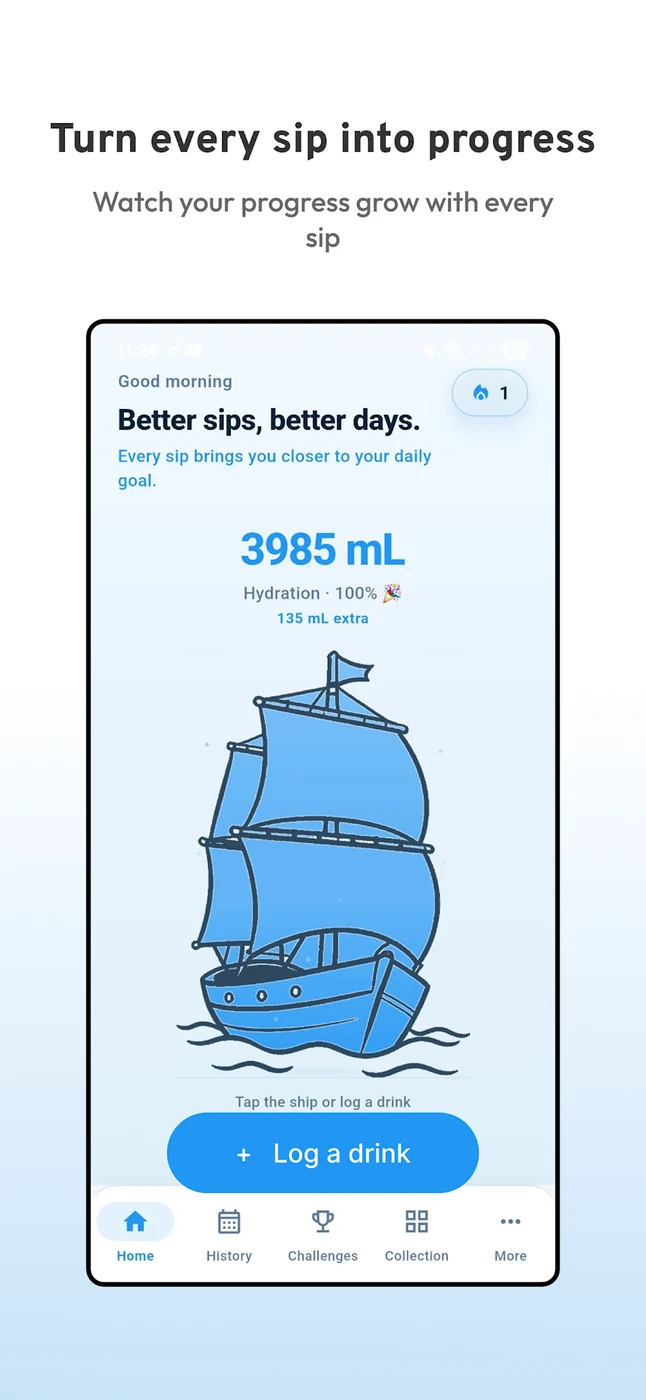
- Remaining volume: SipHours updates after every log so mid-day catch-up is obvious.
- Waking-hour context: Reminders only while you are awake, tied to the same SipHours goal.
Set the tracker goal using trusted ranges
BLUF: Seed SipHours with ~2.7 L (men) or ~2.1 L (women) of drinks unless a clinician gave another number, remembering National Academies / Mayo Clinic total-water figures are higher because food counts. SipHours then becomes the water intake tracker that proves whether that seed was realistic. Adjust after reviewing a full week—not after one busy Tuesday.
| Tracker setup | Suggested SipHours goal | Reminder window | Logging tip |
|---|---|---|---|
| New habit, adult woman | ~2,100 ml / ~71 oz | Wake→sleep | Use 250 ml presets |
| New habit, adult man | ~2,700 ml / ~91 oz | Wake→sleep | Use 300 ml bottle custom |
| Training week | +300–600 ml on workout days | Same waking hours | Log gym bottle immediately |
| Clinician fluid limit | Exact prescribed ml/oz | Clinician-safe timing | Never exceed the order |
Explore the broader SipHours product surface on Features and the cluster bridge to choosing a water drinking app.
How to log water without slowing down your day
BLUF: SipHours sip logging is built for one tap so the water intake tracker does not become a chore. Choose a preset that matches your cup, or enter a custom amount for large bottles. Edit or delete mistakes so SipHours history stays clean.
- Match presets to real cups. Measure your mug once; map it to a SipHours preset.
- Log immediately. Delayed logging is how trackers rot.
- Use custom amounts for bottles. A 750 ml bottle should be one honest SipHours entry—or three 250 ml taps if that feels clearer.
- Protect sleep. Keep SipHours waking hours accurate so overnight reminders never punish you for tracking.
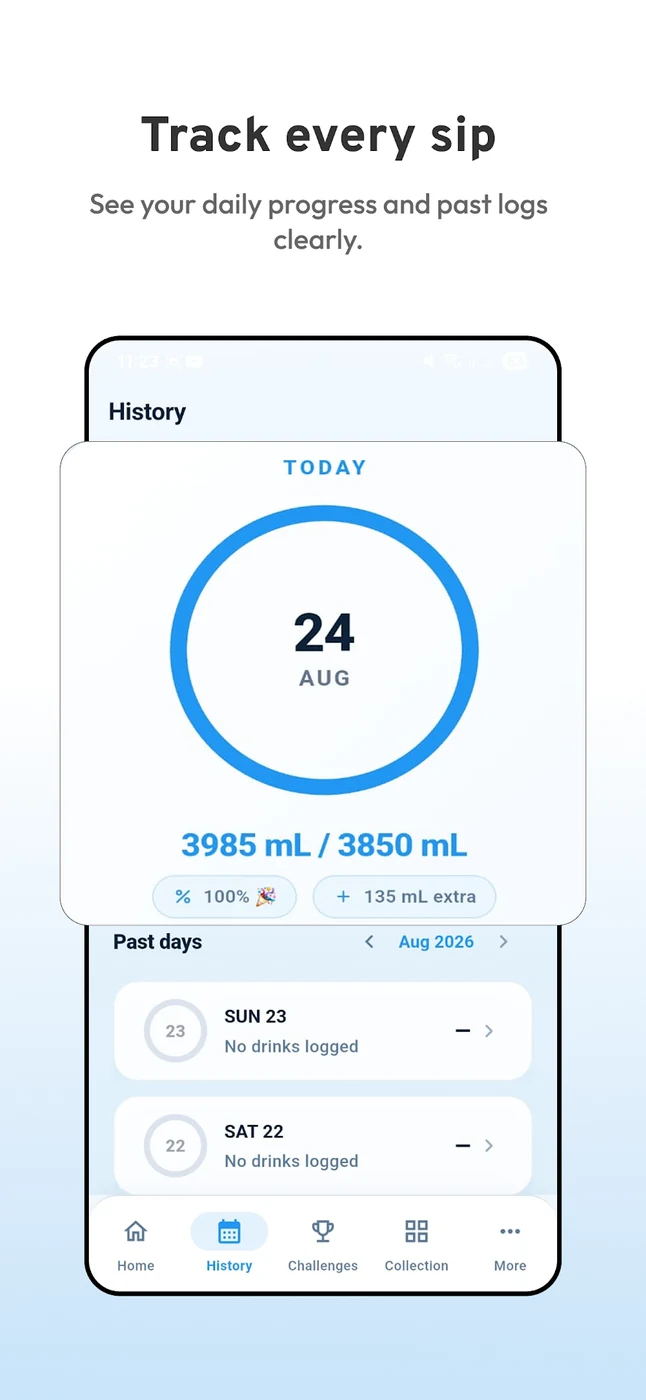
- Review nightly in 20 seconds. Glance at SipHours percent complete; note the gap for tomorrow.
Waking-hour reminders make the tracker work
BLUF: A water intake tracker without reminders is a diary you forget to open. SipHours sends gentle hourly prompts only during waking hours and ties them to remaining daily goal volume. That loop—remind, sip, log—is the SipHours product thesis.
If you dismiss every reminder without logging, SipHours cannot invent progress. Treat each prompt as a micro-decision: drink and tap, or postpone with intention. Over a week, SipHours history reveals whether your tracker goal needs the calculator again or a lower, more finishable number.
Reading tracker data without obsessing
BLUF: Use SipHours history to spot patterns, not to shame a single missed day. Three solid days and one travel day still teach more than zero data. For visual weekly views, continue to the water intake chart support post while SipHours remains the logging source of truth.
- Morning-heavy weeks: You may front-load and then stall—keep SipHours afternoon reminders audible.
- Meeting-heavy weeks: Batch a bottle before long calls and log it in SipHours.
- Weekend drift: Keep the same SipHours waking hours or edit them if sleep shifts.
- Overshoot days: Extra heat or salty food may justify a temporary SipHours bump.
Paper charts vs SipHours as your water intake tracker
BLUF: Paper and notes apps can work short-term; SipHours wins for daily automation because reminders, goals, and logs live in one free Android app. SipHours offline-friendly logging also helps when your commute has weak signal. Pricing stays $0 forever with no in-app purchases; iOS is coming soon.
| Method | Goal setting | Reminders | History | Cost |
|---|---|---|---|---|
| Sticky notes | Manual | None | Easy to lose | $0 but fragile |
| Generic notes app | Manual | Phone calendar hacks | Scattered | Free tier varies |
| SipHours | ml/oz daily goals | Hourly waking-hour prompts | Built-in progress analytics | $0 forever, no IAP |
SipHours Editorial recommends SipHours when your real problem is consistency. If you only need a one-week experiment, any log works—but SipHours removes the reminder engineering.
Privacy and honesty while tracking
BLUF: Track for yourself first. SipHours is a personal hydration habit tool, not a public scoreboard. Honest milliliters beat inflated “I definitely finished” entries that break the feedback loop. When health conditions apply, share SipHours totals with a clinician rather than improvising higher goals.
Food still contributes water even when your SipHours log shows only drinks. That is expected when you use drink-focused targets near ~2.7 L / ~2.1 L against higher National Academies total-water context. Keep the distinction clear so the tracker does not panic you into unsafe chugging.
Try SipHours: Start a free water intake tracker with ml/oz goals and waking-hour reminders—Download SipHours free on Google Play. Android is live at $0 with no IAP; iOS is coming soon.
FAQ
What is the best way to track water intake every day?
BLUF: Set a clear ml/oz goal, log every sip immediately, and use reminders during waking hours. SipHours combines those three jobs in one free Android water intake tracker. Review SipHours history weekly and adjust the goal using calculator or clinician guidance.
How much water should my tracker goal be?
BLUF: Many adults start near ~2.7 L (men) or ~2.1 L (women) of drinks, informed by Mayo Clinic / National Academies total-water context and the fact that food contributes moisture. CDC-style advice still favors water quality choices while you track volume in SipHours. Clinicians first for medical limits.
Can SipHours track ounces and milliliters?
BLUF: Yes. SipHours daily goals and sip logging support ml and oz so your water intake tracker matches the markings on your bottle. Pick one unit and stay consistent for cleaner SipHours charts later.
Do I need the internet for SipHours tracking?
BLUF: SipHours is built to keep sip logging responsive even when the network is spotty, so commuting and gym basements still count. Reminder scheduling and daily goals remain part of the free SipHours feature set on Android.
Is SipHours a free water intake tracker?
BLUF: Yes. SipHours is $0 forever with no in-app purchases on Google Play. Goals, reminders, logging, history, and scenes are included. iOS is coming soon—see SipHours features for the full list.